
“Always send PDF” and “always send Word” leave out the application instructions and the actual document. This guide explains a US-English submission workflow, using named vendor documentation and constructed files. It does not rank every hiring platform or claim that a format changes your chance of an interview.
Start with the employer's instructions
Read the posting, upload control and any recruiter instructions. If they specify DOCX, submit DOCX; if they specify PDF, submit PDF. If the instructions conflict with what the form accepts, use an available contact to clarify rather than renaming a file's extension. Changing a filename from .pdf to .docx does not convert its contents.
| Situation | Practical choice | Check before sending |
|---|---|---|
| The employer names a required format. | Use the requested format. | Confirm that the file is actually that type and meets the stated size limit. |
| The portal accepts only one of the two formats. | Use the supported format. | Open the converted file and check layout, text and any populated fields. |
| Both are accepted and no preference is stated. | Use an inspected version. A text-based PDF is a reasonable choice when preserving its appearance matters; keep an editable source available. | Check the file itself and the application preview or extracted fields. Do not infer a vendor-wide winner. |
| A recruiter explicitly asks for an editable document. | Provide DOCX if that is the requested editable format. | Remove unfinished comments or revisions and reopen the saved version. |
| The application asks you to paste text into fields. | Enter the requested text and upload a file only where instructed. | Review line breaks, dates and sections after pasting rather than assuming the attachment replaces the fields. |
| Your PDF is a scan or picture of the resume. | Return to an editable source and produce a document containing text where possible. | A document that looks readable can still lack usable text. Review the resulting text and fields. |
Penn Career Services' February 2026 formatting guidance recommends PDF to preserve appearance unless the employer directs otherwise. That recommendation helps with the visual presentation; it is not a certification that every parser extracts the PDF correctly.
Upload acceptance, parsing and selection are different
| Stage | What it establishes | What it does not establish |
|---|---|---|
| The form accepts the upload. | The file met the upload control's supported type and size conditions. | That every name, date, employer, skill or section was extracted correctly. |
| The system extracts information. | Some text or candidate fields were read from the file. | That all fields are complete, in the correct order, or evaluated against a universal passing score. |
| The employer reviews or selects candidates. | The employer applies its process and criteria to the application. | That a file extension or a public checker alone explains the decision. |
Greenhouse's supported-upload documentation, updated August 19, 2026, lists DOC, DOCX, PDF, RTF and TXT and permits candidate uploads up to 100 MB. Its separate unsuccessful-parsing documentation, updated March 2, 2026, states that resumes larger than 2.5 MB cannot be parsed. Those are different limits for different operations, not a universal resume size rule.
The parsing guide also describes partial or failed imports involving images, tables, columns, inconsistent sections, and contact information in headers, footers or text boxes. When parsing fails, Greenhouse can retain the attachment while candidate details need manual entry. Do not turn that documented behavior into a claim that every failed parse means automatic rejection.
For the broader workflow, read how an ATS works. Vendor capabilities and an employer's configuration are separate questions.
What to inspect in each format
| Check | DOCX | |
|---|---|---|
| Visual review | Open the final PDF and inspect page breaks, spacing, clipping and links. | Reopen the saved DOCX in an appropriate editor and inspect page breaks, spacing and any changed layout. |
| Text review | Check whether text can be selected, then inspect a copied or extracted version for missing content and reading order. | Inspect the text and confirm that essential information is not confined to an unexpected header, text box or other layout element. |
| Content cleanup | Check that the export contains the intended final wording. | Review comments and tracked revisions before sending the intended final version. |
| Application review | Inspect the preview and populated contact, work and education fields where available. | Inspect the same fields; do not assume an editable file always imports correctly. |
Selecting text or copying it into a plain-text view is a useful diagnostic, not proof of an employer parser's behavior. The local extraction tool, document structure and employer system can use different methods. Use the ATS-friendly layout checklist for headings and structure rather than repeating the whole layout guide here.
A paired, illustrative file inspection
Download the illustrative PDF and companion DOCX. They are editorial examples for comparing files, not real applicant records or evidence of hiring success. The DOCX is a companion asset created for this guide; it does not represent a DOCX export feature in Resume Leap.
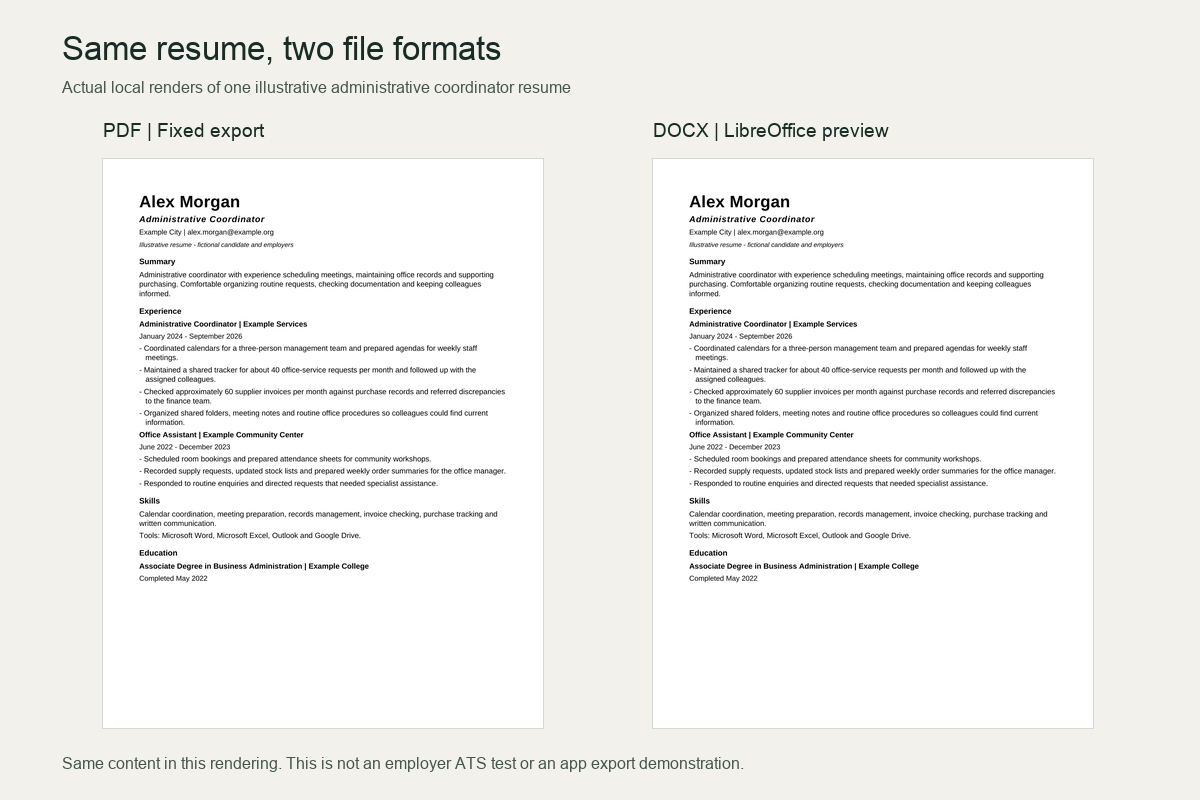
On October 9, 2026, we created one fictional administrative-coordinator resume in DOCX using python-docx 1.2.0, then exported that same source to PDF with LibreOfficeDev 26.8.0.0.alpha0. The file contains 24 paragraphs and 202 whitespace-delimited words, including the illustrative label, headings, contact details and list hyphens. It uses a single column and ordinary paragraphs rather than tables or text boxes.
| Check | Method | Observed result |
|---|---|---|
| Wording and reading order | Compared the complete source with DOCX paragraph text read by python-docx 1.2.0 and PDF text extracted in plain mode by pypdf 6.10.0; normalized whitespace only. | All wording and order agreed, including contact details, dates, seven experience bullets, skills and education. |
| Page and visual review | Rendered the DOCX locally through LibreOffice and reviewed the exported PDF. Page rasters were produced at 150 dpi. | Both showed one US Letter portrait page, 612 × 792 points. The comparison image shows these actual local renders. |
| Text rather than image-only PDF | Inspected extracted PDF text and image objects. | The PDF text was selectable and extractable, and the PDF contained zero image objects. |
| DOCX review artifacts | Inspected the DOCX package for comments and tracked insertions or deletions. | No comment parts or tracked insertions/deletions were present in this fixture. |
| Font handling | Compared the requested DOCX font with the fonts embedded in the PDF. | The DOCX requests Arial; the local PDF export embeds Liberation Sans subsets. Inspect the result rather than assuming the requested font is used in every renderer. |
The DOCX side is a LibreOffice preview, and the PDF was exported by the same renderer. Their matching appearance is a local preservation check, not an independent Microsoft Word or Google Docs comparison. One simple file pair does not test scanned files, complex layouts, every font or any employer's parsing and matching features. The candidate and employer names are fictional, so this is also not a test of real candidate-field recognition.
What the inspection can establish
A local file comparison can document what these specific files look like and what named extraction tools returned. It cannot establish that one extension is better across all layouts, that an employer will extract the same fields, or that a candidate will be selected.
A pre-submission checklist
- 1Check the posting and upload control for the requested file type, size and any naming instructions.
- 2Save the intended final file and reopen it; inspect page breaks, contact details, headings and the last line on each page.
- 3Check its text for missing content, merged sections or an unexpected reading order. Correct the source document where needed.
- 4Check links and remove unfinished comments, revisions and placeholder information.
- 5Upload the file and review the preview and any populated fields. Correct mistakes where the application permits it.
- 6Keep the exact submitted file and the corresponding job description for your own records.
Resume Leap exports a text-based PDF. Review that export before using it, and use the employer's requested format even when another application would be easier to produce. Its keyword overlap and AI resume assessment review text; they do not test your finished document inside an employer's parser.
Next, use the tailoring guide to align supported evidence with the role, or choose the next relevant step from the ATS resume guide hub.