
A project can demonstrate a capability when a job title alone does not. That may be useful for a first application, a career change or work where technical artifacts matter. It does not make a project equivalent to professional experience: state the setting, your contribution and what was actually completed.
Constructed examples, not candidate outcomes
The four entries below are editorial illustrations. The people, organizations, project histories and achievements are fictional. The support-ticket exercise is reproducible first-party synthetic data, and every record is fictional. No example establishes a hiring result or an improvement for a real organization.
Choose relevant work and a useful place for it
Start with the posting's responsibilities and qualifications. A project belongs when it supplies evidence you can explain: a query, a documented prototype, a process checklist or another relevant output. UConn's section guidance describes choosing sections that fit your experience. The University of Florida's technical-resume guide includes personal, academic and open-source projects and recommends showing individual technical contributions. These are organizing options, not a guarantee about screening.
| Situation | Useful placement | Keep the distinction clear |
|---|---|---|
| Projects are your strongest relevant evidence. | A Projects section near your skills or education may make that evidence easier to find. | Label independent or academic work instead of presenting it as an employer. |
| A project is part of a job or internship. | Describe it under that existing experience when the context is important. | Keep the official title, employer and employment dates. |
| One course project is the relevant item. | A compact entry under Education can avoid an unnecessary separate section. | Name the course or academic setting and your part of the work. |
| The work adds little to this application. | Leave it out, or use a portfolio link for optional detail. | A section does not need filler to reach a fixed entry count. |
Use consistent entry labels and readable dates. If several projects belong together, reverse chronological order is one useful arrangement; relevance may justify grouping them by type. Follow the employer's requested structure where one is specified. A complete first-job resume and the data analyst example show how projects fit alongside other sections.
Example 1: Academic team project
Constructed fact sheet: a student worked on a three-person operations course team from September to December 2025. The assignment was a room-booking prototype. This student maintained the requirements worksheet, built the Excel booking view and presented the walkthrough; teammates wrote the survey questions and final report. The prototype was evaluated in class and was not installed as a campus booking system.
Illustrative project entry
Room-booking prototype — Operations course team | September–December 2025. Built an Excel booking view and requirements worksheet for a three-person course project; documented conflicting time-slot requests and presented the prototype walkthrough. Classroom prototype; not deployed as a live reservation system.
| Part of the entry | Evidence to retain | What the wording avoids |
|---|---|---|
| Excel booking view / requirements worksheet | The student's workbook, revision history and requirements notes. | Claiming software engineering or tools not used. |
| Three-person course project / personal tasks | Assignment brief and a contribution statement agreed with teammates. | Taking credit for the team's survey or complete report. |
| Classroom prototype; not deployed | Course presentation and the final prototype status. | Inventing campus adoption, time savings or user impact. |
Example 2: Independent data analysis
Constructed fact sheet: an applicant completed the support-ticket exercise below in October 2026. They used Python's standard-library CSV and SQLite modules to load the data, wrote grouped SQL queries and documented the treatment of missing resolution times. The chart was produced offline from the calculated results. This is an instructional personal project, not work for a support team or real customers.
Illustrative project entry
Fictional support-ticket analysis — Independent instructional project | October 2026. Queried 48 synthetic tickets in SQLite to report channel volumes and average elapsed resolution hours; excluded 2 unresolved records from means and documented the calculation. Produced a results table, chart and reproduction instructions; no real customer data or business-impact claim.
| Part of the entry | Evidence to retain | What the wording avoids |
|---|---|---|
| SQLite / channel volumes / elapsed resolution hours | CSV, readable queries and outputs that another reader can reproduce. | Listing analytics tools not used or calling an average a predictive model. |
| 48 synthetic tickets / 2 unresolved records | Dataset provenance and the explicit NULL-handling rule. | Presenting fictional records as real operations or silently treating unresolved time as zero. |
| Results table, chart and instructions | The published exercise and documented limitations. | Claiming improved resolution speed, revenue or a deployed dashboard. |
Example 3: Volunteer operations project
Constructed fact sheet: a volunteer helped coordinate sign-up records for two community collection events from March to June 2026. They maintained a spreadsheet rota, checked overlapping assignments and wrote a handover checklist. The event lead approved staffing decisions. Personal contact details stayed in the organization's restricted records; a public portfolio could show a blank checklist only with permission.
Illustrative project entry
Collection-event rota and handover — Volunteer operations project | March–June 2026. Maintained spreadsheet assignments for two community collection events, flagged scheduling overlaps to the event lead and wrote a handover checklist. Kept volunteer contact details in restricted records; final staffing decisions remained with the lead.
| Part of the entry | Evidence to retain | What the wording avoids |
|---|---|---|
| Spreadsheet assignments / overlap checks | An authorized, redacted record of the work or confirmation from the lead. | Claiming responsibility for every event operation. |
| Two events / handover checklist | Event dates and the permitted checklist version. | Inventing attendance growth or reduced staffing costs. |
| Restricted contact records / lead decisions | Permission boundaries and a safe description of the process. | Publishing personal data or inflating the volunteer's authority. |
Example 4: Software project
Constructed fact sheet: an applicant built a personal task-board prototype from January to March 2026 with React, TypeScript and SQLite. They implemented task creation, status filtering and a local persistence layer, and documented setup and limitations in a README. The prototype ran locally with fictional task data; it had no production users, external security review or claim of production readiness.
Illustrative project entry
Local task-board prototype — Independent software project | January–March 2026. Built task creation, status filtering and SQLite persistence with React and TypeScript; documented local setup and known limitations. Prototype used fictional task data and was not deployed for production users.
| Part of the entry | Evidence to retain | What the wording avoids |
|---|---|---|
| Creation, filtering and local persistence | Source files, commits and a reproducible local demonstration. | An unexplained stack list or features that exist only in plans. |
| Setup and known limitations | README with actual prerequisites and incomplete features. | Claiming security certification, comprehensive testing or production readiness without evidence. |
| Local prototype / fictional data | Accurate delivery status and data provenance. | Invented user counts, commercial deployment or productivity gains. |
Before-and-after wording for the same four entries
| Project | Before — insufficient or misleading | After — bounded contribution |
|---|---|---|
| Academic team | Led a campus-wide booking transformation. | Built the Excel booking view and requirements worksheet for a three-person classroom prototype. |
| Independent analysis | Improved customer support speed with data analytics. | Queried 48 fictional tickets in SQLite and documented the exclusion of 2 unresolved records from elapsed-time means. |
| Volunteer operations | Managed all event operations and cut staffing costs. | Maintained spreadsheet assignments for two events and flagged scheduling overlaps to the event lead. |
| Software | Launched a production task-management platform. | Built a local React/TypeScript task-board prototype with SQLite persistence and documented its limitations. |
The after versions do not need an invented percentage to be useful. They identify actions and outputs the candidate can explain. Add a measured outcome only when it exists and you can show the calculation; the quantification guide covers that separate task.
Reproduce the fictional support-ticket exercise
This first-party synthetic fixture contains exactly 48 fictional records, including 2 unresolved tickets. It is deliberately small enough to inspect. Download the editorial exercise ZIP for the complete CSV, readable SQL and standard-library Python reproduction instructions. No sign-in, paid software or product generation is required.
| Field | Meaning | Interpretation |
|---|---|---|
| ticket_id | Unique fictional identifier, ST-001 through ST-048. | An identifier is not a customer or employee record. |
| opened_at | UTC timestamp when the fictional ticket opens. | ISO 8601 UTC; no local time-zone conversion is required. |
| resolved_at | UTC timestamp when it resolves; two values are blank. | Load blanks as SQL NULL, not zero hours or the current time. |
| channel | Fictional email, chat or web category. | The balanced category sizes were authored, not sampled from customers. |
| issue_category | Fictional issue label for grouped inspection. | A category label does not establish severity, difficulty or staffing needs. |
- 1Read the CSV with Python's csv.DictReader and create a SQLite tickets table with the five named fields.
- 2Load each row once, using ticket_id as the primary key. Convert each blank resolved_at field to NULL.
- 3Check that COUNT(*) is 48, COUNT(resolved_at) is 46, and their difference is 2.
- 4For each resolved ticket, calculate (julianday(resolved_at) - julianday(opened_at)) × 24. This is elapsed calendar time in hours, not business hours.
- 5Group by channel and calculate COUNT(*) for volume, COUNT(resolved_at) for resolved records, and AVG(duration) for the mean. SQLite AVG ignores the unresolved NULL durations; round the final means to two decimals.
- 6Compare the outputs with the table below, inspect the chart and retain the missing-data rule with any project description.
A worked row: ST-001 opens at 2026-09-01 09:00 UTC and resolves at 11:00 UTC on the same day, so its elapsed duration is 2 hours. An unresolved record remains in the volume count but contributes no duration to the mean. Do not replace it with zero, which would change the question the calculation answers.
| Group | All tickets | Resolved | Unresolved | Mean elapsed hours — resolved only |
|---|---|---|---|---|
| 16 | 15 | 1 | 17.33 hours | |
| chat | 16 | 16 | 0 | 16.81 hours |
| web | 16 | 15 | 1 | 16.77 hours |
| All channels | 48 | 46 | 2 | 16.97 hours |
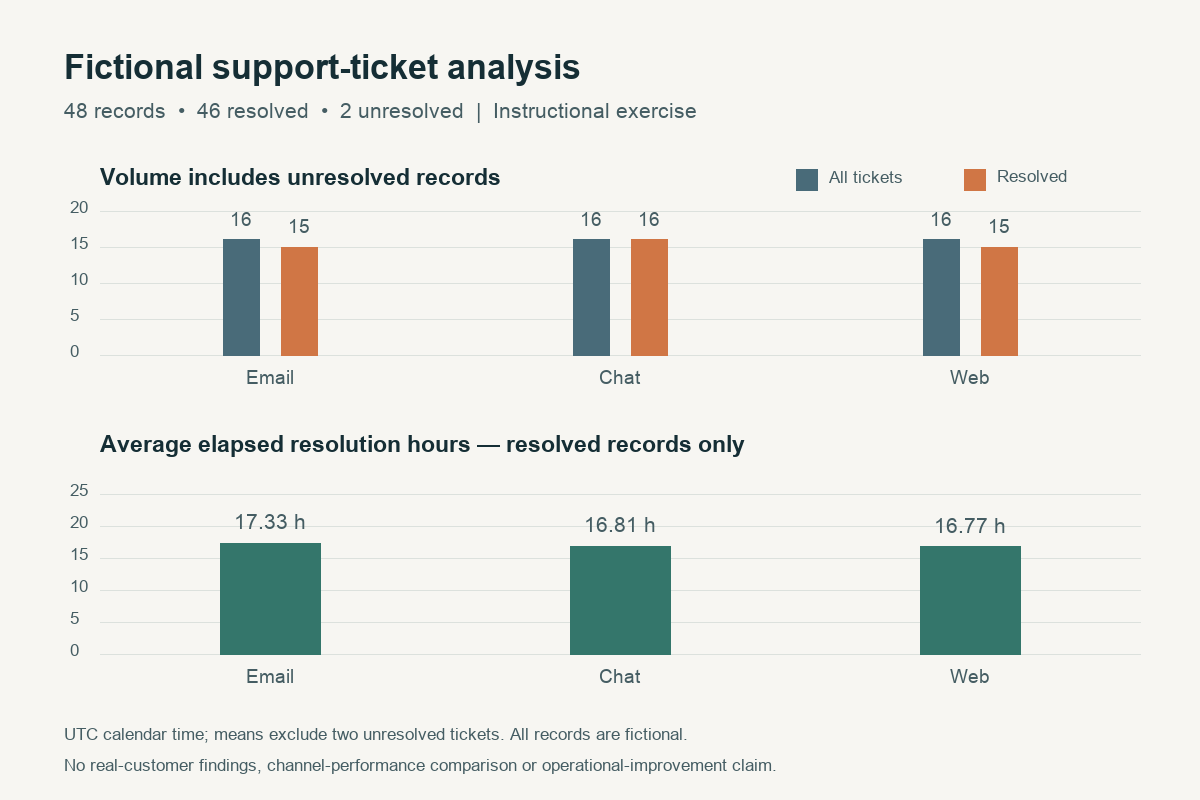
These authored records support a reproducibility demonstration only. They cannot establish which channel is faster for a real team: channel allocation and durations were constructed, with no sampling design or control for issue difficulty. The means also say nothing about customer satisfaction, business-hour service levels, operational improvement or hiring outcomes. State these limitations rather than inventing an impact claim.
Map a requirement to project evidence
| Requirement | Available evidence | Your contribution | Truthful wording / gap |
|---|---|---|---|
| Illustration: SQL aggregation | CSV, SQLite queries, grouped results and documented NULL handling. | Loaded fictional data and wrote the queries. | Analyzed 48 synthetic tickets in SQLite; no real operations or production-database experience claimed. |
| Name a tool or method from the posting. | What file, notebook, prototype or authorized record demonstrates it? | Which parts did you personally implement or check? | Name the method and setting; omit tools merely listed in the assignment. |
| Name a coordination or communication task. | What schedule, checklist, presentation or approved process record remains? | What did you maintain, write, organize or present? | Describe your role without taking credit for decisions made by others. |
| Name a qualification you do not yet meet. | Is there completed evidence, current learning or no evidence? | Separate finished work from planned work. | Record the unresolved gap. A related project does not automatically equal professional certification or experience. |
The worksheet is a selection aid, not a checklist of facts to manufacture. For wording around tools and methods, use the skills-section examples. For selecting the rest of the application, follow the worked tailoring guide.
Portfolio links, confidentiality and unfinished work
- ▸Use a descriptive link label and a destination that a reader can open. Check access from a signed-out browser; do not make a private repository sound publicly reviewable.
- ▸Provide context in the README or portfolio page: project purpose, source or fictional-data provenance, your contribution, setup instructions and current limitations.
- ▸Respect employer, course-team and volunteer permissions. Keep personal records, credentials, proprietary code and sensitive business information out of public artifacts.
- ▸Use an authorized redacted artifact or a general task description when you cannot share the original. Fictional replacement data must be labeled and cannot prove a real outcome.
- ▸Describe a prototype, partial implementation or cancelled project at its actual stage. Link to describing unfinished or cancelled work for those cases rather than implying it launched.
Before submitting, confirm that project names, dates, tool claims, individual contributions and links agree across the resume and portfolio. Explain an introductory section only when it adds useful context; the summary examples include situations where no introduction is needed. Projects should help a reader understand your work, without replacing qualifications the posting genuinely requires.