
The existing Resume Leap workflow
Tailor your résumé to a job description
Resume Leap creates a job-specific résumé draft from your Master Profile and a job description. You review the wording, correct the facts, choose the design and export a PDF. Generated wording does not establish qualifications. Check every draft against your facts; it does not guarantee a screening result.
Editorial demonstration by Resume Leap Editorial Team.
Choose Create account on the next screen, or sign in to your existing account.
From your profile to a reviewed draft
1. Build your Master Profile
Add your work, education, skills and other relevant experience. Use information you can support; the profile is your input, not an independently verified record.
2. Enter a job title and description
Use the actual posting to give the draft its target. Check required and preferred qualifications yourself.
3. Generate a job-specific draft
AI uses your career-profile information and the job description to draft a résumé. Relevance and wording still need your judgment.
4. Review and edit
Compare the draft with your source facts. Correct titles, dates, tools, responsibilities and figures; remove any unsupported claim. Adjust the design and review the preview.
5. Export a PDF
Export the reviewed résumé as PDF. Follow the employer’s requested file format and check any application fields filled from your upload.
See the current design and preview components
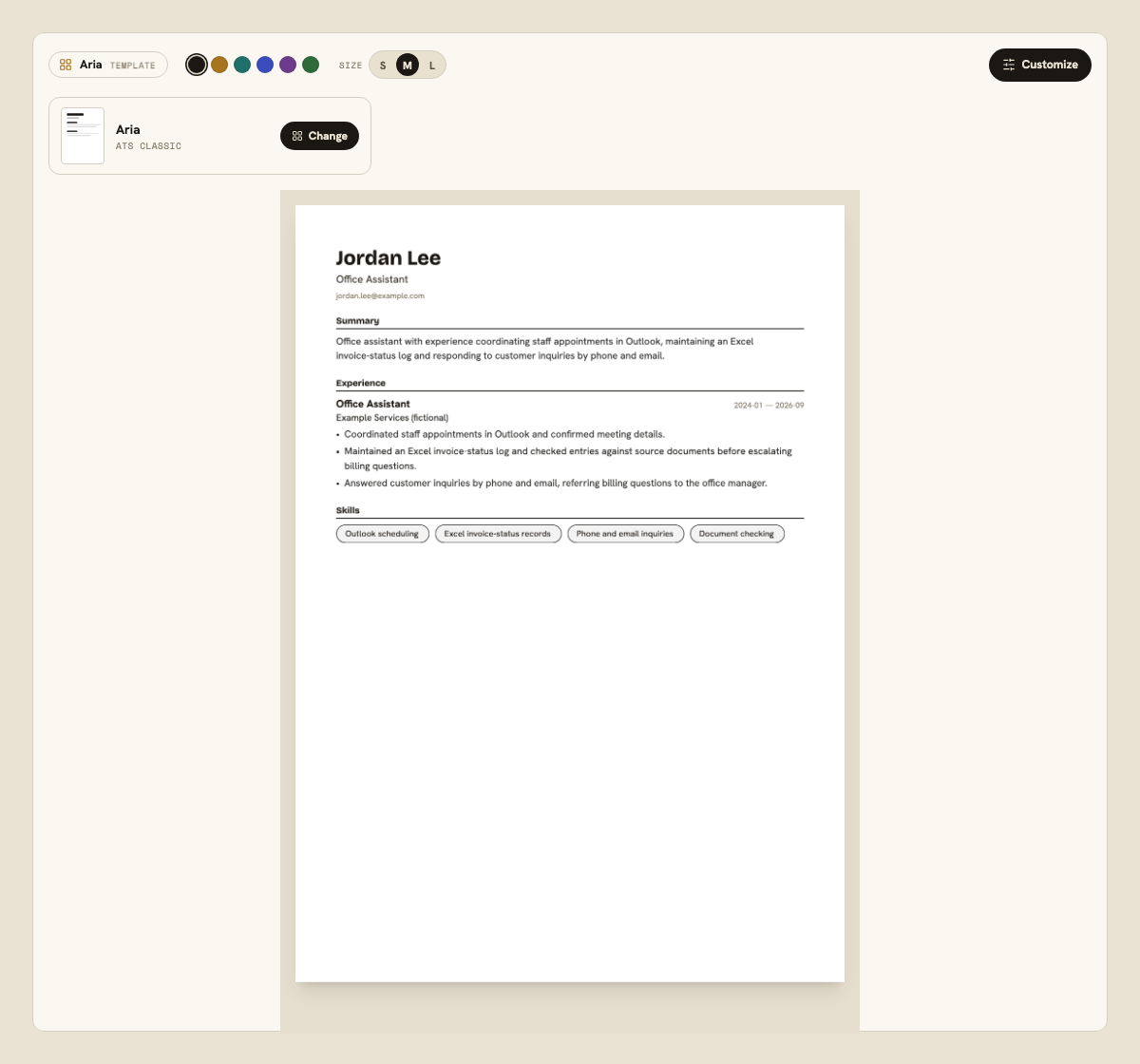
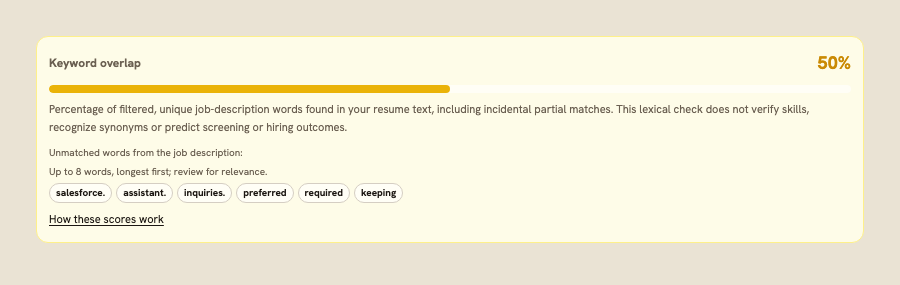
These static images show existing product components with the fictional office-assistant example described below.
What the draft changes—and what you must review
| What the draft changes | What you must review |
|---|---|
| A job-focused summary and experience wording | Whether each statement is accurate, relevant and supported by your actual experience. |
| Selection and emphasis of information from your profile | Whether important qualifications were omitted, unrelated details received too much space, or the chronology became unclear. |
| Job-description language where it relates to your background | Whether tools and skills reflect what you have used. A preferred qualification you lack must stay a gap. |
| A draft you can edit and preview with résumé design controls | Readability, length, contact details and the employer’s submission instructions. A preview cannot test every employer’s parser. |
A constructed office-assistant edit
This editorial example illustrates truthful tailoring. The fictional posting requires Outlook scheduling, Excel record keeping and customer support; Salesforce is preferred. The wording below was written for the demonstration.
Candidate fact sheet
- Jordan Lee is a fictional Office Assistant at Example Services, January 2024–September 2026.
- Jordan scheduled staff appointments in Outlook, maintained an Excel invoice-status log and answered customer inquiries by phone and email.
- Jordan checked invoice entries against source documents and referred billing questions to the office manager.
- Jordan has not used Salesforce. No efficiency increase, revenue result or customer-satisfaction score is documented.
| Posting requirement | Available evidence | Truthful wording | Limit or gap |
|---|---|---|---|
| Required: Outlook scheduling | Scheduled staff appointments in Outlook | Coordinated staff appointments in Outlook and confirmed meeting details. | No gap in this constructed fact sheet; verify the scope against your own records. |
| Required: Excel record keeping | Maintained an invoice-status log; checked entries against source documents | Maintained an Excel invoice-status log and checked entries against source documents before escalating billing questions. | No advanced Excel functions or accounting qualification are established. |
| Required: customer inquiries | Answered inquiries by phone and email | Answered customer inquiries by phone and email, referring billing questions to the office manager. | No response-time or satisfaction metric is documented. |
| Preferred: Salesforce | No Salesforce use | Do not add Salesforce to the skills section. | Unmet preferred qualification. Decide whether to apply after reviewing the complete posting. |
For a complete instructional case, read how to tailor a résumé to a job description.
Two review aids, with different limits
Keyword overlap
The deterministic check compares filtered unique words from the job description with résumé text, including incidental partial matches. It does not understand synonyms, verify a qualification or predict screening. Review unmatched words for relevance rather than adding them automatically.
Optional AI résumé assessment
The optional report provides an Overall assessment score and comments across five categories. Results can vary; there is no documented fixed weighting or calibration to hiring outcomes. It does not test employer parsers.
Read the score methodology and worked example to understand both measures. For employer workflows, see how an ATS works.
Credits and the Free plan
- A résumé generation costs 4 credits.
- An optional AI résumé assessment costs 3 credits.
- The Free plan includes 20 one-time credits and storage for 1 résumé. Free credits do not refill; other AI actions also use credits.
See pricing and all credit costs for the available plans.
Questions about tailoring with Resume Leap
Do I need an account to tailor a résumé?
Yes. This public page explains the workflow. Select Start with a free account to open the account screen, then choose Create account or sign in. The page does not run a résumé generation.
What information does the résumé draft use?
It uses your career-profile information and the job title and description you provide. Review the output against your records and the posting; AI can omit, misinterpret or add unsupported details.
Will the draft add a qualification I do not have?
You must not claim a qualification you cannot support. Review every draft and remove incorrect tools, credentials, metrics or responsibilities. Missing qualifications remain gaps even if related words appear in the posting.
Does a higher Keyword overlap mean the résumé will pass screening?
No. Keyword overlap is a lexical comparison, not an employer’s screening score. It cannot verify skills, account for all application rules or predict a hiring decision. The optional AI résumé assessment is also a review aid, not a parser test or hiring prediction.
Can I download a DOCX résumé from the product?
Resume Leap’s product export is PDF. Check the employer’s instructions first. If a Word document is required, use an appropriate way to prepare that file and review its contents; the separate PDF-versus-DOCX guide includes editorial demonstration downloads.
Continue with skills-section examples, supported achievement wording and PDF versus DOCX submission guidance. The ATS guides reading path helps you choose a next check.
Choose Create account on the next screen, or sign in to your existing account.